
Visual Web Technologies®
  • 0 Shopping Cart
  • Home
  • Store
    • Browse All
    • cPanel Hosting
    • Business Web Hosting
    • Directadmin Hosting
    • Wordpress Hosting
    • cPanel Reseller Hosting
    • DirectAdmin Reseller Hosting
    • Dedicated Servers
    • Dallas Dedicated Servers
    • 256 IPs Dedicated Server
    • Germany Dedicated Server
    • OpenVZ Linux VPS - Mumbai, India
    • Russia Linux VPS - (100Mbps)
    • Germany Linux VPS - (100 MBPS)
    • Netherlands Linux VPS - (1Gbps)
    • Web Hosting Range
    • KVM Ryzen 5950XSSD Series
    • NVMe SSD Web Hosting
    • SPanel Web Hosting
    • Singapore Directadmin Shared Hosting
    • Lifetime Web Hosting Premium
    • Monthly Web Hosting
    • PLesk Linux Hosting
    • AWS Public Cloud Servers
    • SSD KVM Plans
    • Website Security
    • E-mail Services
    • Website Backup
    • SEO Tools
    • Site Builder
    • Register a New Domain
    • Transfer Domains to Us
  • Announcements
  • Knowledgebase
  • Network Status
  • Affiliates
  • Contact Us
  • More
  • Account
    • Login
    • Register
    • Forgot Password?
  1. Portal Home
  2. Knowledgebase
  3. cPanel - Control Panel
  4. How to create Cronjob via cPanel?

  Categories

Billing & Accounting
2
Domains & DNS
12
Introduction
2
20i Cloud Hosting
22
Advanced Knowledge
1
Affiliates & Resellers
5
Articles
1
Backup/Restore
4
Basics, Abuse & Other Information
5
Client Area
10
cPanel - Control Panel
21
DirectAdmin Tutorials
28
E-mail
4
FAQ
3
General Issues
2
Linux VPS
3
LiteSpeed
3
Malware
1
Payment Options
0
Reseller Hosting
1
Shared Hosting
5
Turkmenistan VPS Hosting
2
Usage Policy
2
Website Builder
1
WordPress
23

  Categories

  Tag Cloud

best wordpress hosting cache plugins change php version cheap reseller hosting india cheap wordpress hosting cpanel cpanel php directadmin directadminwebhosting Joomla LiteSpeed litespeed hosting multiphp php php version folder php version per folder reseller hosting india secure wordpress ssd Turkmenistan Turkmenistanvps unlimited reseller hosting india use php 5.5 on folder vps wordpress wordpress hosting

  Support

My Support Tickets
Announcements
Knowledgebase
Downloads
Network Status
Open Ticket

How to create Cronjob via cPanel? Print

  • 0

1. Log into your cPanel account.
2. In the "Advanced" section, click on "Cron Jobs" Icon. 

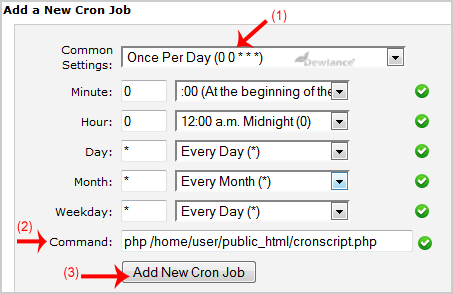
3. Under "Add a New Cron Job", click on the "Common Settings" dropdown menu and select an appropriate option such as "Once Per Day" or another suitable option.

4. Enter your cronjob php file location or the command you want to run in the Command field.
5. Click on the "Add New Cron Job" button. 
  •  

Was this answer helpful?

Related Articles

How to Reset my cPanel Account Password? If you can access your cPanel account, follow these steps to reset your password:1. Log into your... How to update your cPanel Contact Information or receive a notification on reaching quota limit? If you want to receive notification on reaching your disk quota, bandwidth usage limit, reaching... How to Change cPanel Style/Theme? Switching over to another cPanel theme with a different style is easy and there are two ways to... How to Change Language of your cPanel? cPanel supports a lot of languages, and if you want to change your cPanel language to your native... How to upload files via the cPanel FileManager? If you don't want to use a 3rd party FTP Software, you can use the cPanel's inbuilt File...
« Back

  Tag Cloud

best wordpress hosting cache plugins change php version cheap reseller hosting india cheap wordpress hosting cpanel cpanel php directadmin directadminwebhosting Joomla LiteSpeed litespeed hosting multiphp php php version folder php version per folder reseller hosting india secure wordpress ssd Turkmenistan Turkmenistanvps unlimited reseller hosting india use php 5.5 on folder vps wordpress wordpress hosting

  Support

My Support Tickets
Announcements
Knowledgebase
Downloads
Network Status
Open Ticket
  • Contact Us
  • Terms of Service

Copyright © 2026 Visual Web Technologies®. All Rights Reserved.


Loading...
Loading...
Choose language
العربية
Azerbaijani
Català
中文
Hrvatski
Čeština
Dansk
Nederlands
English
Estonian
Persian
Français
Deutsch
עברית
Magyar
Italiano
Macedonian
Norwegian
Português
Português
Română
Русский
Español
Svenska
Türkçe
Українська

Choose Currency

USD
₹ INR
€ EUR
C$ CAD
£ GBP

Generate Password

Please enter a number between 8 and 64 for the password length